Data indexing
Every dataset becomes a searchable index
DeepMiner imports CSV, XLSX, JSON (array) and NDJSON files, plus JSON records through the API. Each dataset becomes a searchable index with a schema: you paste a sample document, DeepMiner infers the fields and types, and you mark the key field. CPF, CNPJ, phone and email fields are recognized as sensitive. The import shows progress in real time and keeps a history.
What you do
Import CSV, XLSX, JSON and NDJSON. Each dataset becomes an index with schema and types.
-
Four file formats
CSV, array JSON, XLSX and NDJSON come in through the Import Data screen. Choose the index, upload the file and follow the total records, the processed ones and the ones that failed.
-
Schema from a sample
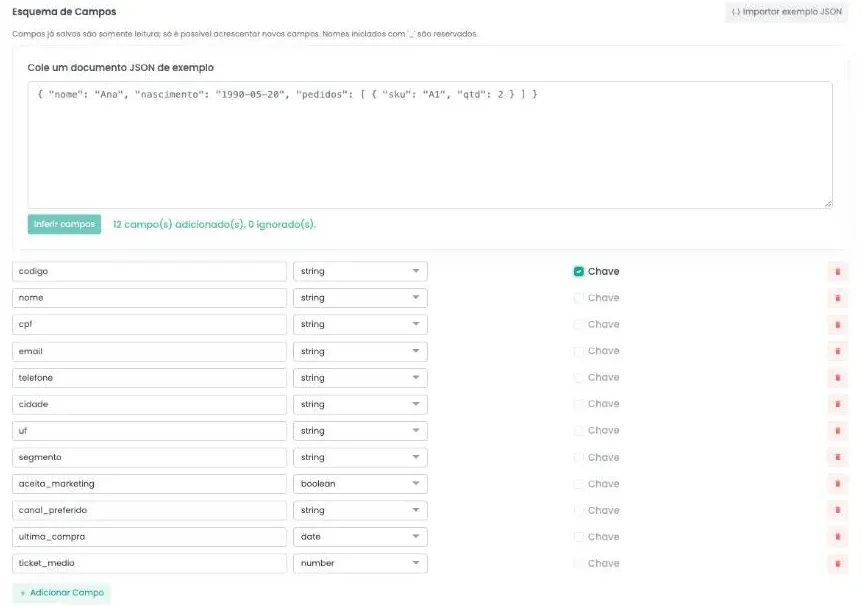
Paste a sample JSON document and click Infer fields. DeepMiner creates the fields with the type text, number, date, boolean, object or list, nested ones included.
-
Key field to reimport without duplicating
Mark a field as the key. When you import again, the record with the same key is updated instead of duplicated.
-
A schema that only grows
Fields already saved become read-only and new fields can be added at any time. Dashboards, flows and earlier queries keep working.
-
Sensitive fields recognized
Fields named CPF, CNPJ, phone or email are marked as sensitive. Their values stay out of the AI prompt and out of dashboard tables.
From file to index
Create the index with a name and a description and define the field schema. The fastest way is to paste a sample record in JSON: DeepMiner reads the structure, creates the fields with their types and shows how many were added. Objects and lists of objects, such as orders inside a customer, become nested fields.
Then, in Import Data, choose the index and upload the file. The progress bar updates by itself and shows the total, the processed records, the failures and the status. The Import History keeps each file with its source (file or API) and the error report.
Different datasets, the same way to query
A CRM export in CSV, an operations spreadsheet in XLSX and a system dump in NDJSON all end up in the same format: an index with a schema. From there, all three answer to the AI assistant, feed dashboards and serve as the source for flows.
Every imported record gets control metadata, such as the import date and status. Names starting with an underscore are reserved for that metadata and for the fields providers send back.
Sensitive fields
Fields named CPF, CNPJ, phone, mobile or email are recognized as sensitive. The AI sees only the name and type of those fields, dashboard tables do not display them, and flow filters ask you to type the value instead of listing the values in the data.
Frequently asked questions
Data indexing
Which formats can I import?
CSV, XLSX, JSON (an array of objects) and NDJSON, one JSON object per line. Through the API, records arrive as a JSON list.
Do I have to create the schema field by field?
No. Paste a sample document and use Infer fields. Then adjust each field's type and mark the key before saving.
What happens if I import the same file twice?
If the index has a key field, records with the same key are updated. Without a key field, each import creates new records.
Can I remove a field from the schema?
No. Fields already saved become read-only so nothing that depends on them breaks. You can add new fields whenever you want.
How do I know whether any row failed?
Progress shows the processed and failed records, and the import history keeps the error report for each file.
See DeepMiner working on your data.
Book a demo and watch a dataset get indexed, enriched and queried.